
How to sign a PDF without uploading it
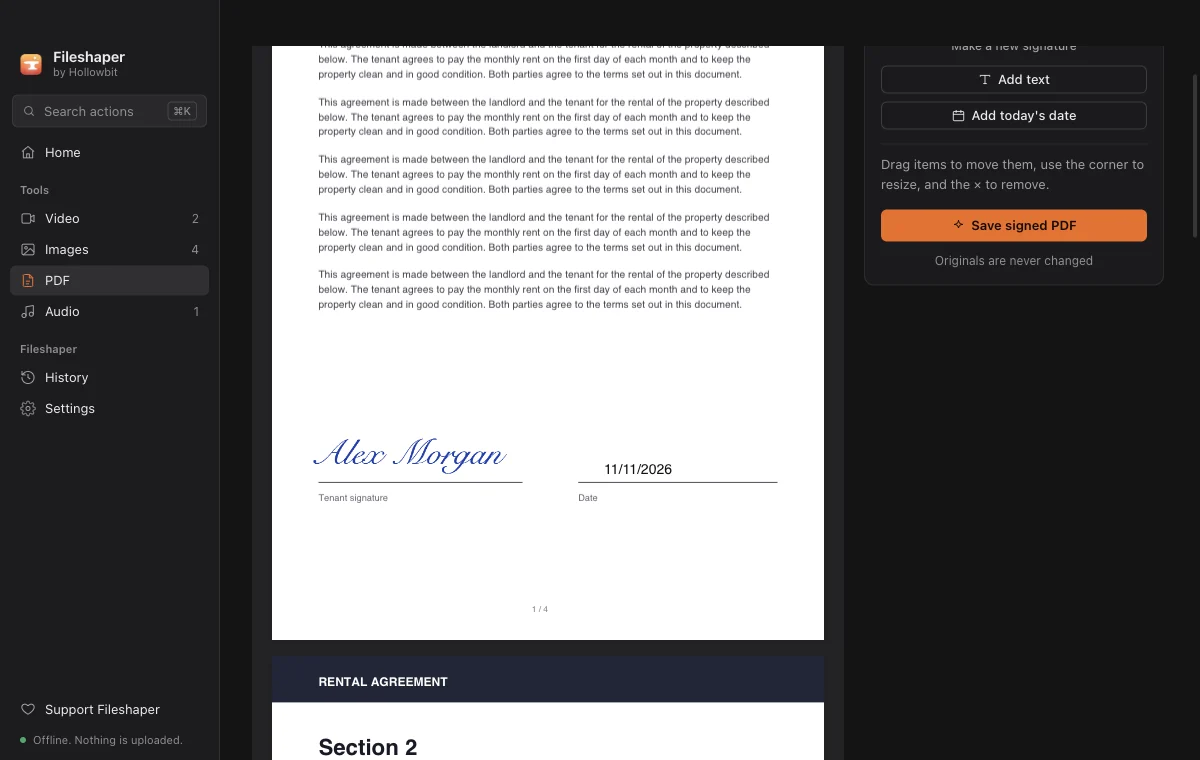
You can sign a PDF entirely on your own computer: open it in Fileshaper, draw or type your signature, drag it onto the signature line, add the date, and save. The signed copy is a new file; the original isn't changed and nothing is uploaded.
Updated 11 November 2026 · Hollowbit
Do it right here
Step by step
- Download FileshaperInstall the free app for Windows or Mac.
- Open PDF, then Sign & fillDrop the PDF on the window and choose Sign & fill.
- Create your signatureDraw it with your mouse or trackpad, or type your name in a handwriting style. It's saved on your computer for next time.
- Place itClick where the signature goes, then drag the corner to resize it. Add your name or today's date the same way.
- Save the signed PDFFileshaper saves a new file ending in "-signed.pdf" next to the original.
Why not use an online PDF signer?
Contracts, leases and forms are some of the most private documents people have. Online signers upload them to their servers, and many require an account or limit free use. Fileshaper does the same job locally.
Is this a legal electronic signature?
Fileshaper places an image of your signature on the page, the same as signing by hand and scanning. That is accepted for most everyday forms and agreements. Some legal documents require a certified digital signature, which is a different technology.
Questions
Can I add the date and my name too?
Yes. Use "Add today's date" and "Add text", then drag them into place.
Does it change my original PDF?
No. The signed version is saved as a new file.
Does it work on scanned PDFs?
Yes. You can place a signature on any page, scanned or not.
More guides
- How to compress a video for DiscordShrink any video to fit Discord's 10 MB upload limit without Nitro and without uploading it to a website. Free, offline, works on Windows and Mac.
- How to open HEIC photos on Windows (and convert them to JPG)iPhone photos are saved as HEIC, which many Windows apps can't open. Convert HEIC to JPG in bulk, free and offline, without uploading your photos.
- How to merge PDF files offlineCombine several PDFs into one in any order, without uploading them. Free and offline on Windows and Mac, with no page limit.