
How to compress a video for Discord
Discord's free upload limit is 10 MB per file. To fit a longer or higher-quality video under it, re-encode it at a bitrate worked out from its length. Fileshaper does that for you: choose "10 MB", and every video lands just under the limit, on your own computer.
Updated 11 November 2026 · Hollowbit
Do it right here
Step by step
- Download FileshaperInstall the free app for Windows or Mac from the download page.
- Drop your video on the windowMP4, MOV, MKV, WEBM and iPhone videos all work. You can add several at once.
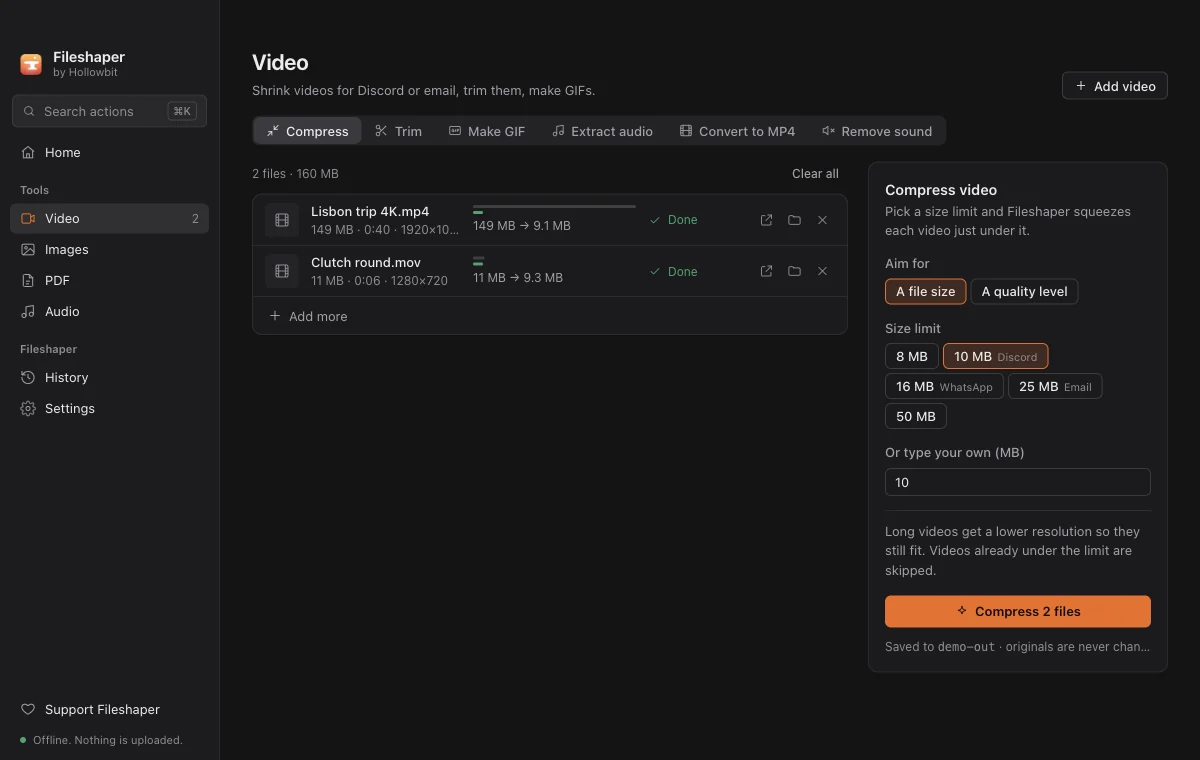
- Choose "10 MB · Discord"Under Compress, pick the 10 MB size limit. Pick 50 MB instead if you have Nitro Basic.
- Click CompressFileshaper encodes each video twice so it lands just under the limit, and saves the result next to the original.
- Upload it to DiscordDrag the new file (it ends in "-10MB.mp4") into your Discord chat.
Why "under 10 MB" needs two passes
A file's size is its bitrate multiplied by its length. Fileshaper measures the length, works out the highest bitrate that fits, then encodes twice: the first pass studies the video, the second spends the data where it matters most. Long videos automatically drop to 720p or 480p so they still look clean instead of blocky.
How long can a 10 MB video be?
Roughly: about 1 minute at 1080p, 2 to 3 minutes at 720p, and 5 minutes or more at 480p. Fast-moving gameplay needs more data than a talking head, so it looks best when the clip is short.
Other ways to do it
Discord Nitro raises the limit. HandBrake is free and powerful but has hundreds of settings and no "fit under 10 MB" option. Online compressors work, but you upload your video to a stranger's server, and most limit file size or add a watermark.
Questions
What is Discord's file size limit?
For free accounts it is 10 MB per file at the time of writing. Nitro subscriptions raise it.
Will the video look worse?
A little, because the same video has to fit in fewer bytes. Short clips under a minute usually look almost identical. Trimming the video first helps more than anything else.
Is it safe to use an online compressor?
It works, but your video is uploaded to someone else's server. Fileshaper never uploads anything.
More guides
- How to open HEIC photos on Windows (and convert them to JPG)iPhone photos are saved as HEIC, which many Windows apps can't open. Convert HEIC to JPG in bulk, free and offline, without uploading your photos.
- How to sign a PDF without uploading itAdd a drawn or typed signature and the date to any PDF without sending your contract to a website. Free and offline on Windows and Mac.
- How to merge PDF files offlineCombine several PDFs into one in any order, without uploading them. Free and offline on Windows and Mac, with no page limit.