
How to open HEIC photos on Windows (and convert them to JPG)
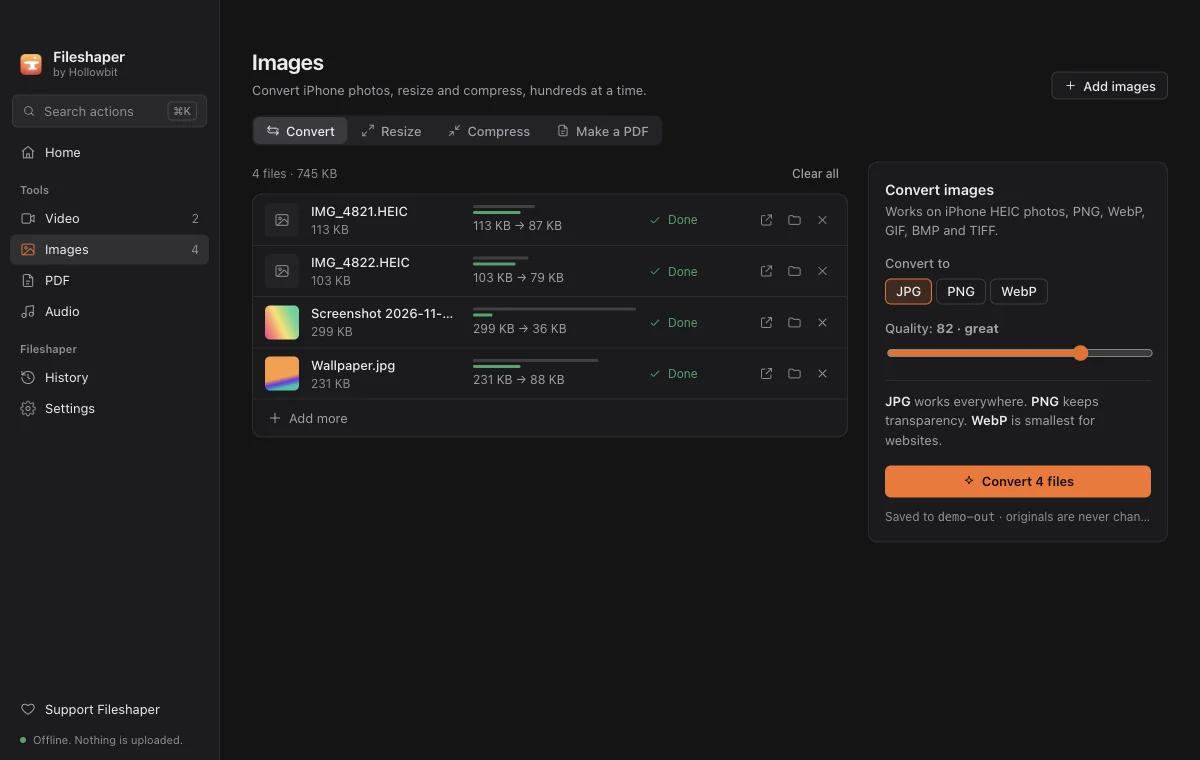
iPhones save photos as HEIC to save space, but many Windows apps, websites and printers only accept JPG. The quickest fix is to convert them: drop the HEIC files on Fileshaper, choose JPG, and it converts hundreds at once on your own computer.
Updated 11 November 2026 · Hollowbit
Do it right here
Step by step
- Download FileshaperInstall the free app for Windows (it also runs on Mac).
- Drop your HEIC photos on the windowSelect a whole folder's worth and drag it in.
- Choose JPGUnder Images, Convert, pick JPG. The quality slider is set to a level that looks the same as the original.
- Click ConvertEach photo is saved as a JPG next to the original HEIC. The originals are never changed.
Why iPhones use HEIC
HEIC (High Efficiency Image Container) stores the same photo in roughly half the space of a JPG. Apple made it the default camera format in 2017. The catch is compatibility: plenty of software still expects JPG.
Stop your iPhone saving HEIC
On the iPhone, open Settings, Camera, Formats, and choose "Most Compatible". New photos are then saved as JPG. Photos you already took stay HEIC, so you still need to convert those.
Other ways to do it
Windows can open HEIC if you install Microsoft's HEIF and HEVC extensions, but that doesn't help with websites that reject HEIC. Online converters work, but they mean uploading your personal photos.
Questions
Does converting HEIC to JPG lose quality?
Very slightly, because JPG compresses differently. At the default quality the difference isn't visible.
Can I convert many HEIC files at once?
Yes. Drop hundreds of photos in one go and Fileshaper converts them all.
Are my photos uploaded anywhere?
No. Fileshaper converts them on your computer and works with the Wi-Fi off.
More guides
- How to compress a video for DiscordShrink any video to fit Discord's 10 MB upload limit without Nitro and without uploading it to a website. Free, offline, works on Windows and Mac.
- How to sign a PDF without uploading itAdd a drawn or typed signature and the date to any PDF without sending your contract to a website. Free and offline on Windows and Mac.
- How to merge PDF files offlineCombine several PDFs into one in any order, without uploading them. Free and offline on Windows and Mac, with no page limit.